MiniMax H3 has given creators something rare: an open-weight video model that can understand text, images, video, and audio together, then generate a finished clip with native stereo sound. It supports 4–15-second output, common aspect ratios, 24 FPS, and up to 2K through the complete hosted workflow. That is powerful—but “open-weight” is not the same as “open your laptop and start creating.”
For most creators, marketers, and product teams, local deployment solves the wrong problem. You do not need another infrastructure project. You need a reliable way to turn an idea or reference asset into a usable video. SeeAPI MiniMax H3 generator is already configured for that job: open the page, choose Text to Video, Image, or Reference, set your duration and resolution, and generate.
What Makes MiniMax H3 Different?
MiniMax describes H3 as a general-purpose, omni-modal generation system. In plain language, that means the model can treat different media as one creative brief rather than forcing you into a separate model for every task.
The official specification supports up to nine reference images, three video clips, and three audio clips, with a maximum of 12 mixed files. You can define a first frame, a last frame, a character reference, a motion reference, or an audio cue. SeeAPI MiniMax H3 generator then jointly predicts video and stereo audio instead of creating a silent clip that needs a second audio workflow.
This makes MiniMax H3 especially interesting for advertisements, product visuals, social clips, title sequences, character work, and motion-led creative concepts. MiniMax reports that early testing showed strengths in instruction following, text and brand rendering, and video-to-video motion transfer. Those are vendor-published observations, not independent benchmark results, but they point to the model’s intended production use.
The Hidden Cost of “Free” Local Deployment
The MiniMax H3 model weights may be available under the MiniMax H3 Community License, but a functioning local pipeline still requires hardware, storage, framework setup, model downloads, dependency management, and ongoing troubleshooting.
The official SGLang example serves each H3 variant across four GPUs. The released H3-Omni-Transformer is a dense 33-billion-parameter model, and the initial open release uses full attention because the planned sparse-attention implementation is not included yet. You must also choose and configure separate checkpoints for FL2VA—text plus optional first or last frames—and Ref2VA for multimodal reference generation.
ComfyUI reduces some coding, but it does not remove the work. You still need the correct model components, the right T2V or R2V workflow, compatible versions, enough GPU memory, and a prompt structure the model understands. Every driver conflict, missing node, out-of-memory error, or update becomes your problem.
There is another important distinction: only H3-Base is available for local 768p generation. The official H3-Context-IR system that interprets complex multimodal inputs and H3-Regenerate-2K stage are hosted services, not part of the initial open release. In other words, even a successful local install does not reproduce the entire 2K experience by itself.
Local MiniMax H3 vs. SeeAPI
Need | Local or ComfyUI deployment | SeeAPI browser workflow |
|---|---|---|
First result | Install frameworks, download components, configure a workflow | Open the generator and enter a prompt |
Hardware | You supply and maintain compatible GPUs | No local GPU setup |
Modes | Configure FL2VA and Ref2VA separately | Choose Text to Video, Image, or Reference |
Resolution | H3-Base generates 768p locally | Select 768P or 2K on the page |
Operations | Drivers, dependencies, memory, queues, storage | Managed in the hosted workflow |
Best for | Researchers and teams needing deep control | Creators and teams needing results now |
Local deployment makes sense when infrastructure control, fine-tuning, or private internal orchestration is the goal. If the goal is to evaluate H3, produce content, or validate a campaign idea, a managed workflow usually delivers value much sooner.
MiniMax H3 Pricing on SeeAPI
MiniMax H3 generation currently starts at 192 SeeAPI credits. More importantly, those credits are not locked to one model: the same balance can be used across SeeAPI for other creative tools, including Seedance and Nano Banana. Credits stack in one balance and do not expire, so you can switch between video and image workflows without buying a separate plan for every model. Rates can change, so confirm the live total in the generator.
You can also earn free credits through consecutive daily check-ins. That gives new users a low-pressure way to build a balance, explore the platform, and decide which ideas deserve a full H3 generation.
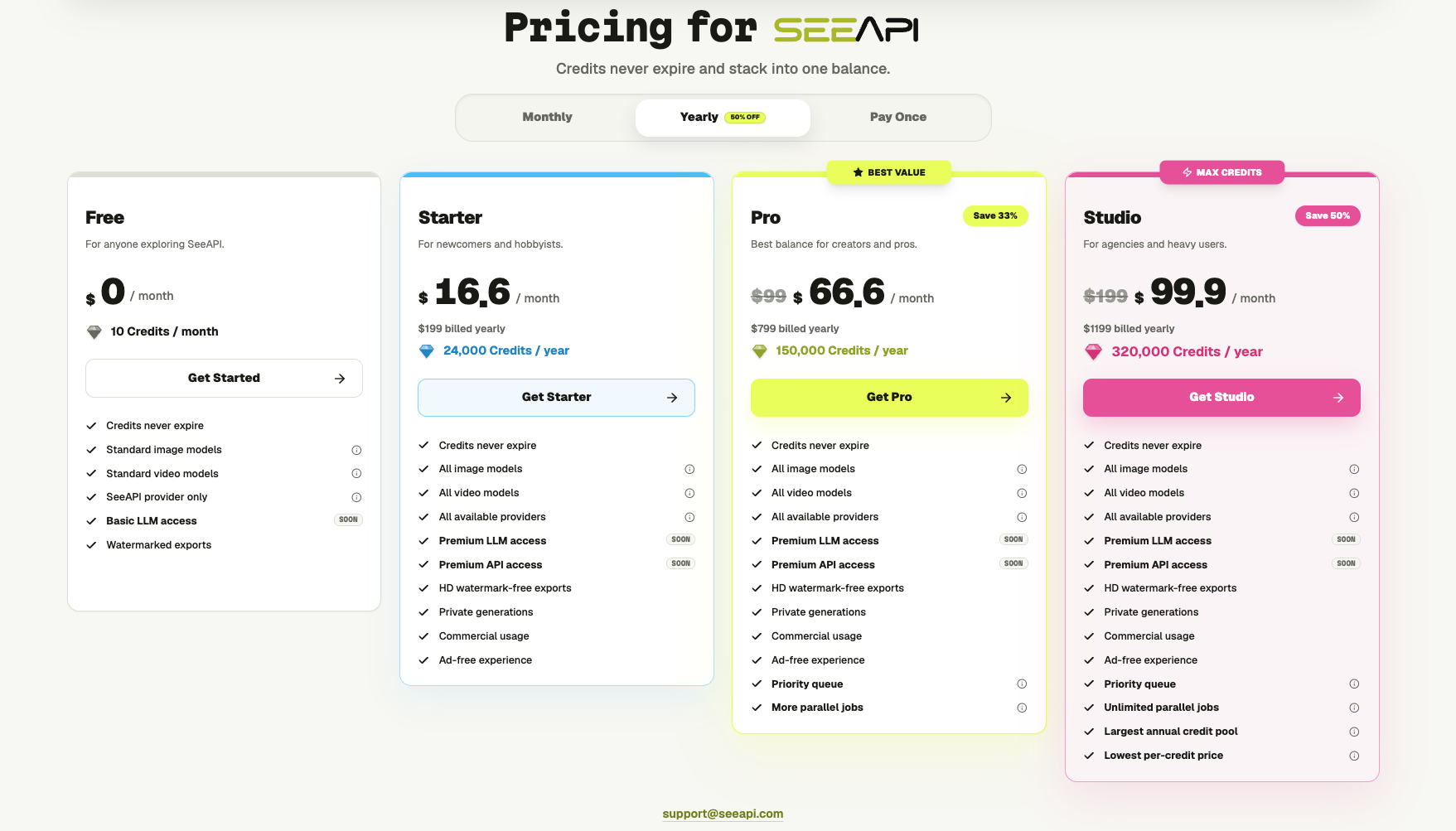
SeeAPI’s plans are designed around how often you create rather than forcing everyone into the same package. Free is for exploration. Starter fits newcomers and hobbyists. Pro adds priority access and more parallel jobs for active creators, while Studio is built for agencies and heavy users with the largest credit pool, unlimited parallel jobs, and the lowest per-credit price. Paid plans also include all available image and video models, HD watermark-free exports, private generations, and commercial usage.
The useful comparison is not simply “paid credits versus free weights.” It is a flexible creative balance versus GPUs, electricity, engineering time, failed configurations, and maintenance. With SeeAPI, you are paying to keep creating—not to keep debugging.
Still Want to Deploy MiniMax H3 Locally?
Use the official repository, review the Community License and territory restrictions, choose the FL2VA or Ref2VA checkpoint, then follow a supported path such as SGLang, vLLM, Diffusers, or the linked ComfyUI templates. Start with local 768p output. If you need the official prompt-refinement stage or 2K regeneration, plan for hosted API calls as part of the pipeline.
SeeAPI also provides MiniMax H3 API access for teams that want programmatic generation rather than a manual browser workflow. Because API access may depend on the current account or rollout stage, confirm availability before planning a production integration; the web generator is available now.
Create First. Deploy Only If You Still Need To.
MiniMax H3 deserves attention because it expands what an open-weight video model can understand and generate. But open weights should create choice, not an obligation to become your own infrastructure team.
If you want to know whether MiniMax H3 fits your creative work, the fastest answer is a finished clip. Open MiniMax H3 on SeeAPI, sign in to start collecting daily check-in credits, choose a workflow, and enter a real brief. When you are ready to create more, choose the plan that matches your pace. You can always build the local stack later—after the model has proved its value.